Build guide
Recommended ESP32-S3 board, DVI pinout, safe wiring, flashing, and first test.
Open build guide
Trimix analyser readings to Niimbot labels
Big dives mean lots of cylinders to analyse, check, mark, and hand around. Handwritten tape can get messy fast, especially when everyone is prepping at once. This independent ESP32-S3-Zero adapter connects a Divesoft Trimix analyser to a supported Niimbot Bluetooth printer, so clear analysis labels come straight out of the workflow.
Nitrox-style labels are free. Helium and Trimix label printing is the optional Pro upgrade. Install the firmware now, then email the Device ID when you want to purchase a Pro licence code for your board.
Available now
The public firmware installer is open. Flash it to a supported ESP32-S3-Zero and use basic Nitrox label printing without a licence. To add helium values and Trimix labels, copy the 12-character Device ID from the local Web UI and email it to request Trimix Pro.
Install it now. When you want Trimix Pro, send the Device ID shown in the Licence section.
Open USB installer Request Trimix Pro by email Online card payment is not enabled yet.Before flashing or updating the Trimix Analyser Connector, disconnect it completely from the Divesoft Trimix analyser. Flash only with USB connected to the ESP32-S3-Zero. Leaving the analyser wiring connected during flashing can backfeed or short signals and may destroy circuits in the adapter or analyser.
On the Divesoft analyser select Menu > Preferences > Send Data to USB > On. Some versions call this Data output. This is required even when the adapter powers on correctly. See the official Divesoft He/O2 manual, section 12 “Connecting to a computer”.
Simple external dongle
The adapter is a small external dongle for the Divesoft Trimix analyser data port. Plug it into the documented connector and it listens to the analyser output while the analyser remains the source of truth for the measurement.
You do not need to open the analyser, solder inside it, or change its electronics. Make the external cable, plug in the adapter, pair it to the printer, and keep the original analyser workflow intact.

One-button mobile printing
When the reading has been checked on the analyser, press the adapter button and the finished label is sent to the paired battery-powered Niimbot printer. No phone, laptop, or handwriting step has to be added while the team is already busy analysing cylinders.
The label is printed clearly for fast checking at the fill station or dive site: mix first, then MOD, END, date, and owner initials. No more decoding rushed handwriting or half-readable tape labels when several cylinders are being prepared at once.

Device Web UI
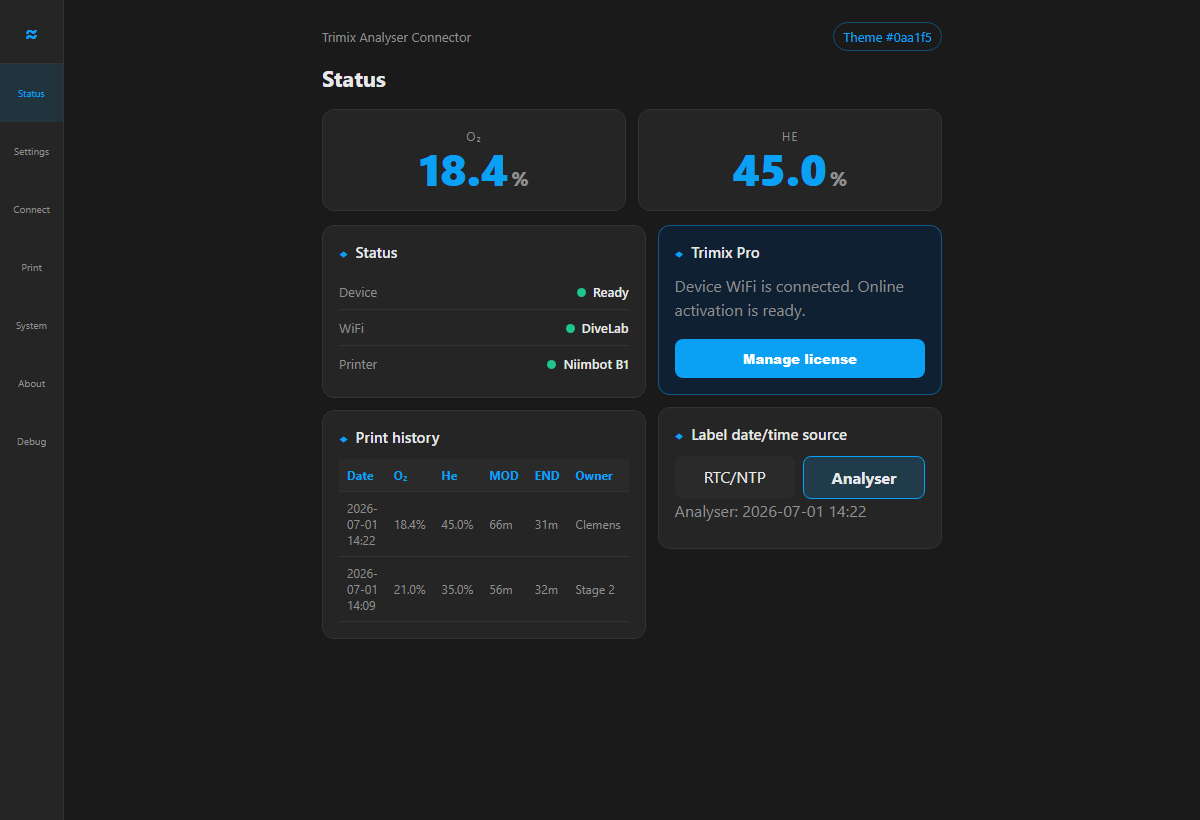
The connector has its own local Web UI with the same blue theme as this site. Use it for printer setup, WiFi, owners, print history, label date/time source, OTA updates, diagnostics, and Trimix Pro activation.
Shopping list
We provide firmware and the installer. You source the electronics, make the Divesoft cable, flash the board from the website, pair your printer, and verify the first labels carefully. You do not need to compile code or install developer tools.
| Qty | Part | Purpose |
|---|---|---|
| 1 | ESP32-S3-Zero-compatible board (non-Waveshare recommended) | Main ESP32-S3 board with USB-C. In our testing, compatible non-Waveshare boards have been more reliable than Waveshare boards, so we recommend a non-Waveshare version. Buy the bare board without fitted pin headers and without a housing so it fits the printed enclosure. |
| Optional | Optional momentary push button | Optional manual print trigger; normally the analyser pause button triggers printing. |
| Optional | DS3231 Mini clock module | Optional clock module for older Divesoft analyser models that do not provide a usable date. |
| 1 | Short insulated hookup wires / cable | Connect the labelled data, ground, optional power, and optional button points. |
| 1 | Male DVI connector with solder pins/pads | Plugs into the analyser rear connector; solder the labelled connections shown in the diagram. |
| 1 | Printed housing set | Holds the ESP32 board, DVI connector, and optional print button. Download the print files on MakerWorld. |
| 2 | M2.5 × 6 mm flat-head screws | Close the printed housing. |
| Optional | Niimbot B1/B21 printer | Bluetooth label output. |
Tools
Soldering iron, multimeter, wire cutters, USB-C cable, printed housing, and two M2.5 × 6 mm flat-head screws.
Skill level
Flash via the website, solder the DVI connector and button, pair the printer, then verify every printed label.
Build kits
We are currently exploring offering build kits: the ESP32-S3-Zero board, DVI connector, optional print button, wiring, printed housing, and two M2.5 × 6 mm flat-head screws in one package, so you only solder and assemble. Before we commit to kits, we would like to hear your feedback first.
Assembly and soldering
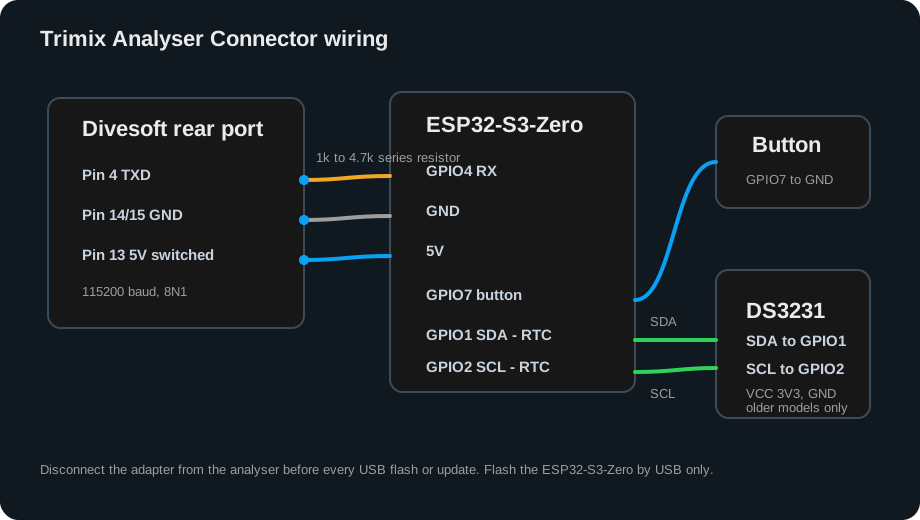
Follow the labelled connections below. Before testing, enable Menu > Preferences > Send Data to USB > On on the analyser. Disconnect the adapter from the analyser before every USB flash or update.
| Connection | ESP32-S3-Zero pin | What to solder |
|---|---|---|
| Divesoft pin 4 | GPIO4 | Solder Divesoft rear connector pin 4 directly to ESP32 GPIO4. |
| Divesoft GND | GND | Divesoft rear connector pin 14 or 15 to ESP32 ground. |
| Divesoft 5V | 5V | Optional power from rear connector pin 13, switched by the analyser power state. |
| Optional print button | GPIO7 and GND | Optional push button for printing. Normally, pausing the Divesoft analyser triggers the label. |
Menu > Preferences > Send Data to USB > On (or Data output). See the official Divesoft He/O2 manual, section 12.Wiring diagram
Connect data, ground, and optional power exactly as shown. Unplug the adapter from the analyser before every USB flash or update.
Printed housing
Fit the electronics and close the housing with two M2.5 × 6 mm flat-head screws.
Download print files on MakerWorldCost before you install
We do not sell the Divesoft analyser, ESP32 board, cable, printer, or finished adapter. You source and build the hardware. Basic Nitrox labels are free; Trimix label printing is the optional Pro upgrade. Install and try the basic workflow first, then email the Device ID from the adapter Web UI when you want to purchase Pro.
No subscription. Helium/Trimix label printing, MOD/END output, and offline-capable signed activation.
Email the 12-character Device ID from the adapter Web UI to hello@trimixanalyser.com. I will arrange payment directly and send the matching activation code. Stripe checkout is not enabled yet.
USB flashing
Use update-only for existing devices so settings and the licence stay intact. Use full install for a new board, recovery, or when support asks you to use it. Firmware installation is available now and does not require a payment step.
Detailed documentation
Simple HTML guides cover building, setup, printing, and common problems.
Recommended ESP32-S3 board, DVI pinout, safe wiring, flashing, and first test.
Open build guideEnglish, German, and Dutch setup and operating instructions.
Open HTML manualRequired menu setting, labelled wiring, and no-reading checks.
Open data-output guideNiimbot setup, pause-to-print, label fields, repeat protection, and verification.
Open label guideAnalyser data, Wi-Fi, LED, printer, licence, and update faults.
Open troubleshootingA spreadsheet-ready CSV with the recommended board, connector, housing, options, and printer.
Download Trimix BOMBuilt from technical and cave-diving experience
Dr. Clemens Chaskel built the connector around the needs of long-duration cave dives, dives deeper than 100 metres, mixed teams, and multi-cylinder gas logistics—while keeping the Divesoft analyser as the source of truth.
More than 30 years of diving experience, GUE Cave 2, CCR 2+, and Tech 2+ qualifications, and a Chartered Engineer's approach shape the connector and its verification workflow.
About Dr. Clemens ChaskelThe adapter copies readings from the Divesoft analyser and prints them. It does not make the gas analysis safer by itself. Always verify the analyser display, gas mix, date, MOD/END, and printed label before diving.
USB flashing